Slackwater vs Tide Alert
Short version. Tide Alert is built around one feature its name promises: the phone tells you when the tide reaches a level or a time. It has a full Watch app, Siri, and now covers Canada and Mexico. Slackwater has a free Watch app and optional Premium alerts and station calendars. Its current stations show the slack window and max, free with no ads. Bundled predictions work offline. Canadian stations need setup, and some passes remain online-only.
Compare the alert types you need as well as the tide and current views.
Slackwater features checked October 9, 2026; Tide Alert's details checked against its US App Store listing and website on October 14, 2026.
At a glance
| Tide Alert (NOAA) | Slackwater | |
|---|---|---|
| Price | Free trial, then $6.99/3 mo or $19.99/yr; Tide Alert Gold $99.99 | Free core; optional Premium |
| Alerts | Tide level and time, phone and Watch | Premium; phone notifications and alarms |
| Apple Watch | Full app with complications | Free standalone app; complications Premium |
| Siri | Yes | No |
| Tides | US, Canada, Mexico, Latin America | Worldwide |
| Currents | Speed from NOAA current stations overlaid on the tide chart, estimated slack windows | Current stations: slack time and duration, max flood/ebb with set, own curve |
| Offline | Favourite stations and month tables | Bundled predictions offline; Canadian setup, some passes online-only |
| Data | NOAA; sources outside the US not named | NOAA and CHS, named per station with datum |
| Widgets | Home screen, lock screen and StandBy | Home screen free; lock screen Premium |
| Ads | No | No |
| Rating | 4.8 (45K) | See App Store |
Side by side
| Tide Alert | Slackwater |
|---|---|
 |
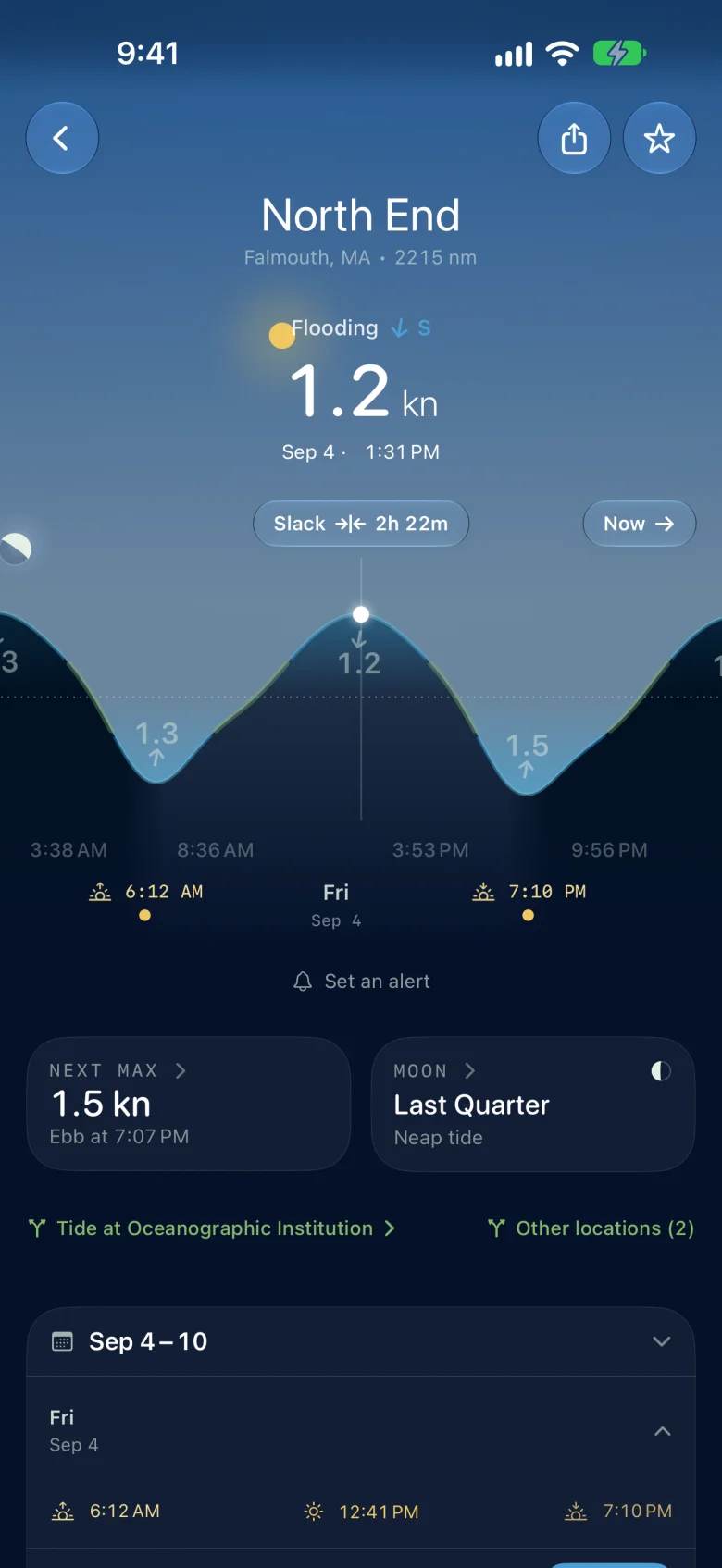 |
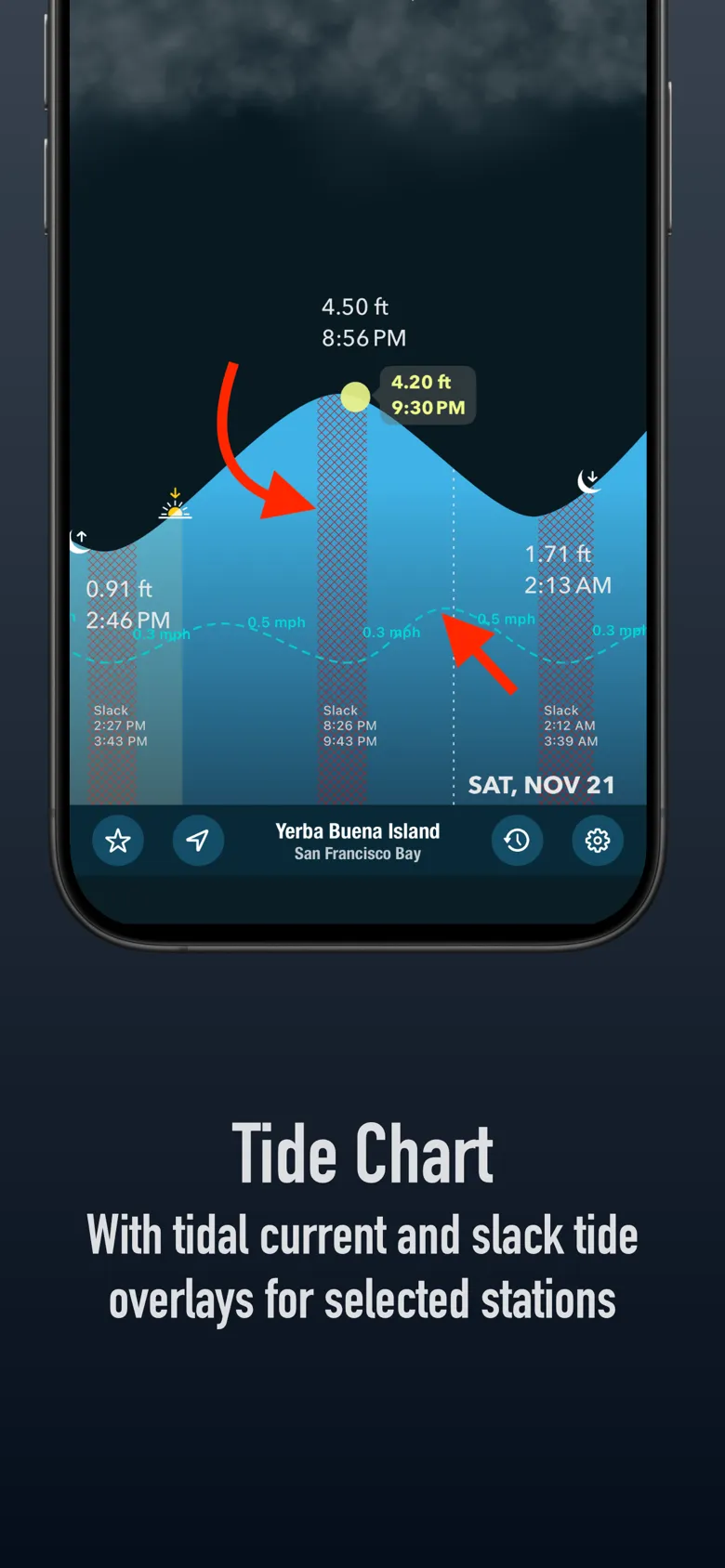
| Tide Alert's own listing: the tide chart at Yerba Buena Island with current speed drawn over it and estimated slack periods shaded. | Slackwater at North End, Falmouth: a current station in its own right, flooding at 1.2 kn, slack in 2h 22m, with the reference tide one tap away. |
Currents
Tide Alert draws current speed on top of the tide chart and marks estimated slack periods. That is a good annotation and it is honest about being an estimate.
Slackwater treats a current station as its own thing, with its own curve. The readout is the state now, the next slack and how long it lasts, and max flood and ebb with speed and direction, scrubbable through the week. The reference port's tide sits on the same screen. For a pass like Deception or Active, the difference between an estimated slack band on a tide chart and a predicted 19-minute window is the difference between a guess and a plan.
Offline
Tide Alert keeps favourites and month tables offline. Slackwater's bundled stations compute predictions and draw their curves on the phone for any date. Canadian stations need an initial download to build their offline model; some Canadian passes require a connection and are labeled in the app.
Alerts and the Watch
Slackwater includes a free Apple Watch app that runs without the phone. Premium adds phone alerts, station calendars and Watch complications. Home screen widgets remain free. Compare Tide Alert's tide-level and time alerts with the events you want Slackwater to notify you about.
Price
Tide Alert is free to try; after the trial its listing says a subscription is required, at $6.99 for three months or $19.99 a year. Tide Alert Gold is $99.99. Slackwater's core is free and stays free, including home screen widgets. Optional Premium adds alerts, station calendars, lock-screen widgets and Watch complications, with annual and lifetime purchase options.
Who should pick which
Tide Alert if its tide-level alerts, Watch interface or Siri support suit you.
Slackwater if you need the slack window at a current station, want every prediction at bundled stations offline without favoriting first, or want free charts with no subscription. Download Canadian stations before leaving signal and check for online-only passes.
Nothing imports. Star your stations in Slackwater by search.
Predictions are not observations. Weather, river flow and local conditions change the water. Neither app is for navigation.
Download Slackwater on the App Store · Free, no account. Requires iOS 26 or later.
See also: the best tide and current apps for iPhone · Tides Near Me alternative