Slackwater vs Actual Currents
Short version. Actual Currents shows you the water moving: animated particles over a nautical chart, with a time scrubber, a wind overlay and route analysis. It is the best picture of flow on a phone. Its model data loads over a connection, and the free tier is three hours either side of now. Slackwater's bundled stations predict on the phone without a connection. Canadian stations need setup, and some passes remain online-only. Its tide and current predictions are free. Both cover Canada, and both now show tides.
They are different tools and plenty of people will want both.
Slackwater features checked October 9, 2026; Actual Currents' details checked against its US App Store listing and website on October 14, 2026.
At a glance
| Actual Currents | Slackwater | |
|---|---|---|
| Price | Free ±3 h window; Pro $2.99/mo; Unlimited $4.99/mo or $39.99/yr | Free core; optional Premium |
| Currents | Animated flow field on ENC charts, NOAA and CHS station arrows, route analysis, next slack at saved places | Station predictions: slack time and duration, max flood/ebb with set, curve |
| Tides | Virtual tide gauge and NOAA tide stations | Worldwide |
| Offline | No offline mode listed | Bundled predictions offline; Canadian setup, some passes online-only |
| Canada | CHS station arrows since v2.04 | 23 CHS gates, checked against CHS predictions |
| Data | Its own tidal model; NOAA and CHS stations, NOAA PORTS | NOAA constituents, CHS; named per station |
| Widgets | No | Home screen free; lock screen Premium |
| Apple Watch | No | Free standalone app; complications Premium |
| Launched | April 2026 | 2026 |
| Rating | 4.7 (21) | See App Store |
Side by side
| Actual Currents | Slackwater |
|---|---|
 |
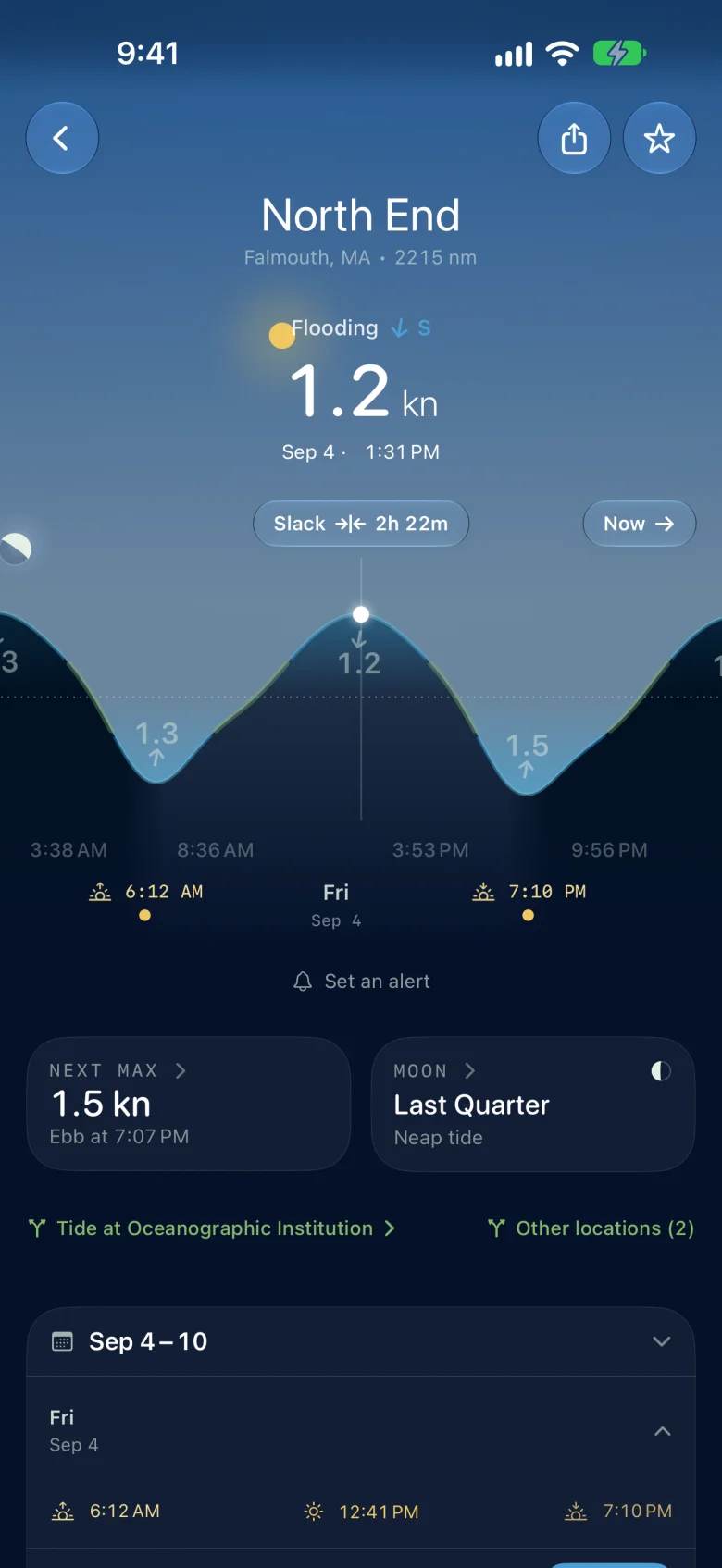 |
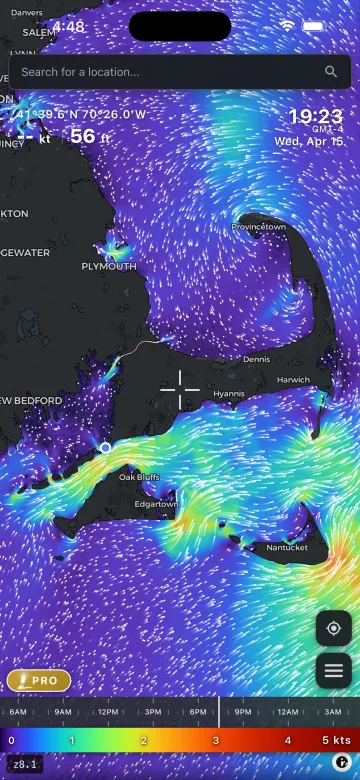
| Actual Currents' own listing: Cape Cod at 19:23, the whole sound moving, coloured by speed. Nothing else on iPhone draws this. | Slackwater on the same water: North End, Falmouth, flooding at 1.2 kn, slack in 2h 22m, next max 1.5 kn ebb at 7:07pm. One station, one answer, computed on the phone. |
What each one answers
Actual Currents answers "what is the whole strait doing at 16:30?" Drag the scrubber and watch Rosario Strait turn. If you are planning a route across a body of water and want to see the set along the way, nothing else on iPhone does this. Its Optimal Departure tool times a route at every departure in a window, and saved places show the next slack at a point you pick.
Slackwater answers "can I get through this pass, and when?" Pick the station, and the readout is the state now, the next slack and how long it lasts, max flood and ebb with speed and set, over a curve you scrub through the week, with the reference port's tide on the same screen. Both apps show tides: Actual Currents through a virtual tide gauge and NOAA tide stations, Slackwater through tide stations worldwide.
Offline
Actual Currents loads its model data over a connection and lists no offline mode. Slackwater computes bundled predictions on the phone for any date. Most Canadian stations build an offline model after a download; some Canadian passes require a connection and are labeled in the app.
Free tier
Actual Currents' free tier is three hours either side of now. Planning tomorrow's departure is $4.99 a month or $39.99 a year. Slackwater's predictions are free for any date. Optional Premium adds alerts, station calendars, lock-screen widgets and Watch complications, with annual and lifetime purchase options.
What Actual Currents has that Slackwater does not
The flow picture, the wind overlay, route planning with current analysis and departure timing, trip logging, and the global ocean surface currents. Slackwater is a station app and does not draw a flow field.
Who should pick which
Actual Currents if you want to see the flow across a whole area, plan a route against it, and you do that at the dock with signal.
Slackwater if you want the slack window at a station, offline, free, with tides.
Both if you plan on Actual Currents and run on Slackwater.
Predictions are not observations. Weather, river flow and local conditions change the water. Neither app is for navigation.
Download Slackwater on the App Store · Free, no account. Requires iOS 26 or later.
See also: the best tide and current apps for iPhone · Slackwater vs AyeTides · Slackwater vs OceanConnect